
Cloudflare’s September 15 Change Could Drop You From Google — Check This Setting Now

In early August, a site owner posted to r/TechSEO with a problem that reads like a misconfiguration and isn’t one. They had flipped a single Cloudflare AI crawler settings toggle — AI Training, set to Block — and within a short while both Googlebot and Bingbot were collecting HTTP 403s every time they tried to fetch the site’s sitemap. Turning the setting back off cleared the 403s immediately. Search Engine Journal covered the thread on August 4; Google’s John Mueller replied asking the poster to get in touch so his team could look at it.
Other people checked their own dashboards and found the same thing. One community manager on the XenForo forums reported watching indexed URLs collapse from over a million to under a thousand. What makes this worth three minutes of your afternoon is not the anecdote — it’s that nothing malfunctioned. Cloudflare’s own July 1 announcement says this is how the system is designed to behave, and on September 15 the behavior becomes the default for a large slice of the network.
Be clear about the size of the risk, though. This doesn’t mean your site disappears from Google overnight — a blocked sitemap fetch is not a deindexing event, and Google tolerates transient errors. But sustained 403 responses can eventually affect crawling and indexing, and the damage compounds quietly because nothing tells you it’s happening. If you have ever clicked anything resembling “block AI bots,” this is worth checking before the deadline rather than after.
Quick answer — can Cloudflare’s AI Training setting block Googlebot? Yes. From September 15, 2026, Cloudflare says multi-purpose crawlers such as Googlebot, Applebot and BingBot can be affected when Training is blocked, because the most restrictive applicable rule wins.
What changed in Cloudflare’s AI crawler settings
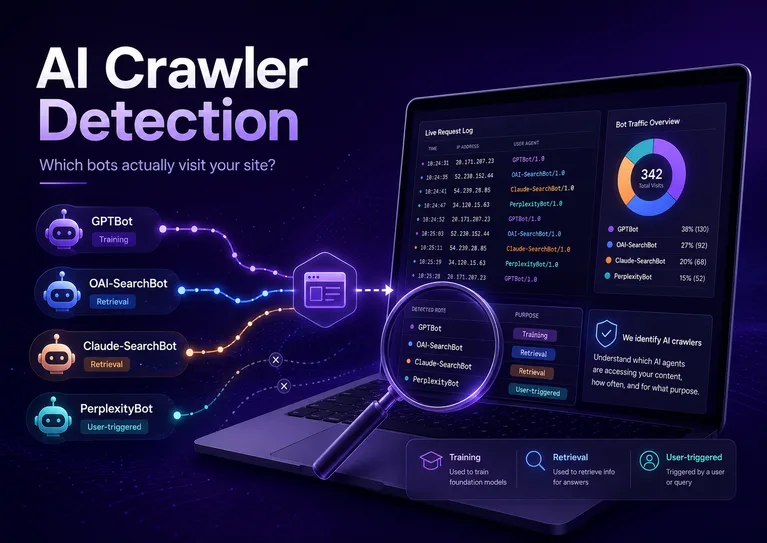
Cloudflare now sorts AI crawlers into three separate classes — Search, Agent, and Training — that you allow or block independently, on every plan including Free. On September 15, 2026, Training and Agent become blocked by default on ad-carrying pages, and crawlers that do more than one job are judged by the strictest rule that applies to any of their jobs.
That last clause is the whole story. Before July, the control was blunt: one “Block AI Bots” switch that mostly caught single-purpose training scrapers. The new taxonomy is finer, which is genuinely an improvement — but a finer instrument in a hand that doesn’t know what it’s holding cuts differently.
Search, Agent, Training: the three buckets
Cloudflare defines the classes by behavior rather than by company. Here is what each one covers and what you actually give up by switching it off.
| Class | What it covers | What blocking it costs you |
|---|---|---|
| Search | Crawlers building an index so they can answer questions about your site later — classic search indexing plus the retrieval layer behind AI answer engines. | Your organic traffic. This is the class that sends humans back to you. Almost nobody should block it. |
| Agent | Automation acting in real time for a person: ChatGPT-User fetching a page mid-conversation, or a browser agent driving Chrome on someone’s behalf. | Real-time citations and any agent-mediated visit. There is usually a human waiting at the other end of an Agent request. |
| Training | Crawlers taking your content to train or fine-tune a model. Your text is absorbed permanently; nothing comes back. | Nothing directly — this is the class most publishers want off. The cost is entirely in the collateral damage below. |
On scope, it’s worth separating what Cloudflare wrote from what was reported. The July 1 announcement states the new defaults for all new domains onboarding to Cloudflare, and says existing customers can opt out in Security settings at any point before September 15. Press coverage at the time — TechCrunch among others — reported the change as also reaching new sites added by existing customers and existing Free-tier accounts. That broader reading is plausible and widely repeated, but it isn’t spelled out in that sentence of Cloudflare’s own post. If your zone is Free-tier and untouched, assume you’re in scope and check; don’t assume you’re exempt because the blog post didn’t name you.
Explicitly configured toggles stand — Cloudflare says customer choice is paramount and that opting out before September 15 confirms you want no changes to Training crawlers that also crawl for Search. But the mixed-crawler logic still applies to whatever you chose. Configured is not the same as safe.
Why blocking Training can take Google with it
Googlebot does not run one crawl for search and a separate crawl for AI training. Neither does Applebot. Neither does BingBot. One crawler, several purposes, and Cloudflare has now decided to label crawlers with all of their purposes rather than picking the dominant one.
Cloudflare’s announcement puts it plainly: multi-purpose crawlers will be allowed or blocked according to all of their behaviors, and the defaults are enforced by the most restrictive applicable rule. Named explicitly in that sentence: Googlebot, Applebot, BingBot. And it applies whether you set Training to Block through the new three-way control or through the legacy “Block AI bots” service.
So the logic runs: Googlebot carries the Training label. You blocked Training. The strictest rule wins. Googlebot gets a 403 — on your sitemap, on your pages, on whatever the rule covers. Not because Cloudflare made a mistake, but because you told it something it took literally.
Cloudflare frames this as a September 15 change, and that’s the date to plan around. But the reports from July and August suggest some zones are already seeing the behavior, which is why the r/TechSEO thread happened before the deadline rather than after it. Treat the date as when this becomes normal, not as when it becomes possible.
There is no error message. Nothing in your WordPress admin changes. You find out weeks later when Search Console reports a sitemap it can’t fetch, or when the indexed-pages graph starts sloping down and you assume it’s an algorithm update.
It’s also worth being clear about what this is not. Google-Extended — the robots.txt token for opting out of Google’s AI training — operates at a completely different layer. Setting it does nothing to your Cloudflare rules, and having set it does not protect you here. These are two separate switches on two separate machines.
Check your setting in four minutes
-
Open Security → Settings in your Cloudflare zone
Pick the specific domain first — these are per-zone settings, not account-wide. If you run ten client sites, that’s ten checks. Look for the AI Crawlers & Scrapers card.
-
Read all three toggles, not just the one you remember setting
Search, Agent, Training. Write down what each one says right now. The state you’re looking for is Training blocked while you assumed Search was unaffected — that’s the combination that bites.
-
If you see “Block AI bots [Deprecating on September 15]”, read the two radio buttons
This is where the deadline actually lives, and it’s the step most people will get wrong. Zones still running the legacy rule show an amber notice explaining that mixed-purpose crawlers — the ones used both for search indexing and for training AI — will be included in the training block on September 15. Underneath it sit two options, and one of them is already selected for you.
Selected by default: “Mixed purpose crawlers will be blocked on September 15.” That is the option that takes Googlebot with it. The alternative — “Mixed purpose crawlers will continue to be allowed” — is the opt-out Cloudflare’s announcement refers to. Choosing it keeps your training block in place while exempting the crawlers that also run search. If you want AI training blocked and Google intact, that’s the one.
Check the Configurations line below it too. It will say something like Blocks AI Bots scope: Block on all pages. Cloudflare’s new September defaults only block on ad-carrying pages, but the legacy rule applies site-wide — so a legacy zone is running a broader block than the thing replacing it.
-
Test the sitemap with a Googlebot user agent
Run a curl request against your sitemap URL with Googlebot’s UA string and look at the status code. A 200 is fine; a 403 with a
cf-mitigatedheader tells you Cloudflare stopped it, not your server. Cross-check with URL Inspection in Search Console — that request comes from Google’s real IPs, which is the version that counts. -
Find out whether Cloudflare owns your robots.txt
Fetch
/robots.txtand read the top. If you see aContent-Signal:line — something likesearch=yes,ai-train=no,use=reference— that’s Cloudflare’s managed robots.txt prepending its own preferences above whatever your WordPress SEO plugin wrote. Your plugin’s rules are still down there; they just aren’t the whole file anymore. If you’re also publishing an llms.txt, it’s worth checking that the two don’t contradict each other — I covered that setup in how to add llms.txt to WordPress.
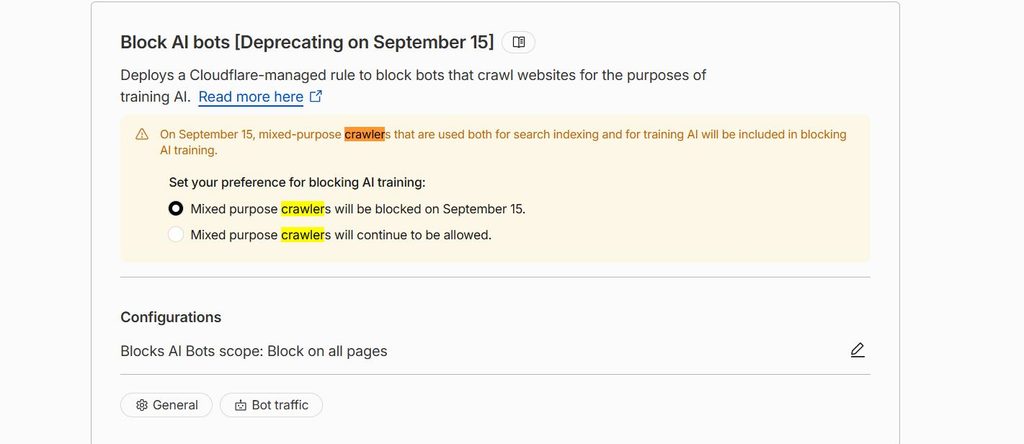
One more thing that panel tells you: the word Deprecating. The legacy control isn’t just changing behavior on September 15, it’s going away. So whichever radio button you pick now, you’ll eventually be moved onto the three-class system and will need to state your preference again there. This is a two-step migration dressed up as a one-time checkbox.
A caveat on that last step: spoofing a user agent from your laptop isn’t the same request Google makes. Cloudflare verifies crawlers by IP, so a fake Googlebot can get blocked for reasons that have nothing to do with your AI settings. Treat curl as the fast signal and Search Console as the verdict.
If you’d rather see this in your own logs than in a dashboard, the AITooler Bot Analytics plugin installs in about a minute and starts recording which bots hit your site and what status code they got back.
What I’d actually set
There is no single correct configuration here, and anyone telling you otherwise is selling something. What you should block depends on where your traffic comes from and what your content is worth. Three rough profiles:
You live on discovery. Blocking Training is the honest position on model training — but this is exactly the combination that catches Googlebot, so you have to opt out of the mixed-crawler default in Security settings and keep verifying that Googlebot returns 200.
Agent is the one to think hardest about. Agentic checkout is arriving, and an agent fetching a product page is a customer with a bot doing the clicking. Blocking Agent to keep competitors from scraping prices also turns away buyers. Rate-limit instead of blocking wholesale.
If protecting copyright is the point, Training = Block is the whole reason this control exists. Just go in knowing the trade: you must explicitly preserve mixed crawlers, or you’ll pay for the principle with your Google index.
It helps to understand who this policy is actually aimed at, because it isn’t you. Naming Google, Apple and Microsoft in a blog post and then setting a default that penalizes their crawlers is leverage — split your bots by purpose, or inherit the strictest rule your customers set. Cloudflare has been open about wanting exactly that. Publishers are simply the ones standing between the two sides until somebody moves, which is why the settings feel like they force a choice nobody wanted to make.
Then verify it worked
Changing a toggle is not the same as fixing a problem, and a Cloudflare dashboard showing “allowed” is a statement of intent rather than evidence. The only proof is a request arriving at your site and getting a 200. That means logs.
Once you’ve adjusted your settings, wait a day and go look at what actually hit your server — which bots came, what they asked for, and what you sent back. That’s the same method I used to answer a different question in how to tell if ChatGPT is reading your site, and it works identically here: the bot list is your before-and-after diff. If Googlebot appears with 200s where it was returning 403s, you’re done.

Open Security → Settings, check whether Training is blocked, and if it is, explicitly opt out of the mixed-crawler default before September 15. Then confirm in your logs that Googlebot gets a 200.
FAQ
Does this affect me if I’m on Cloudflare’s free plan?
Probably, and you should assume so. Cloudflare’s announcement states the new defaults for all new domains onboarding to the platform; press coverage reported the change as extending to existing Free-tier accounts that haven’t set a preference. The broader scope isn’t confirmed in that line of Cloudflare’s own post, so treat it as likely rather than settled — and check your zone either way, since the mixed-crawler logic bites regardless of which reading is right.
I only use Cloudflare for DNS. Am I safe?
If your traffic isn’t proxied — grey cloud in the DNS panel — Cloudflare never sees the request and can’t block it. Check the cloud icon per record rather than assuming. Mixed setups are common: the apex proxied, a subdomain not.
Should I be checking this every week?
No, but you should check it more than once. Defaults shift, plugins rewrite robots.txt, and someone on your team eventually clicks something. The sane version is an automated check — fetch your sitemap with a Googlebot UA on a schedule and alert on anything that isn’t a 200. I’ve written up that kind of scheduled pipeline in this piece on n8n automation; the same pattern applies to a crawler health check.
Is blocking AI Training even worth it anymore?
That depends on what your content is and where your traffic comes from, and reasonable people land in different places. Blocking Training is a real statement with a real cost attached; allowing it is a bet that discoverability outweighs what gets absorbed. What isn’t defensible is choosing by accident — which is what a forgotten 2025 toggle amounts to.