I Built an AI Receptionist for a Small Business: 10 Test Calls with Vapi
Tested November 7, 2026 · Vapi free credit, browser test calls, one fictional hair salon.
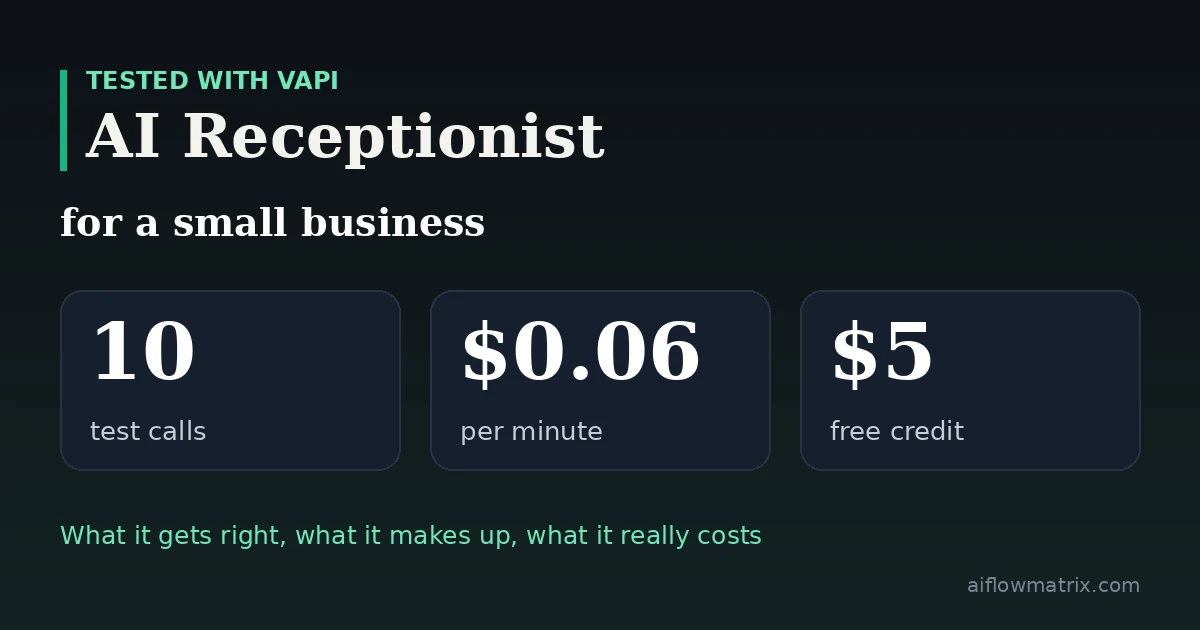
An AI receptionist for a small business can answer the phone, quote prices, give hours and directions, and take booking requests. I built one for a fictional hair salon with Vapi and ran ten test calls. It got the facts right in most calls, offered only real time slots and stayed calm with an angry caller. It also misread a phone number once, told a caller “we don’t offer” a service it knew nothing about, and drifted back to English when I spoke Turkish. Real cost: about $0.06 per minute. Out of the box it takes booking requests but doesn’t book anything; that needs a calendar integration.
- Platform
- Vapi
- Free credit
- $5, no card
- Speech-to-text
- Soniox
- Language model
- GPT-4.1 Mini
- Real cost
- ~$0.06/min
- Typical call
- 1–2 min, $0.07–0.14
- Phone number needed?
- Not for testing
- Books appointments?
- Not without integration
- 1The setup: a fictional salon and one shared prompt
- 2Building the receptionist in Vapi
- 3Ten test calls: what it got right and wrong
- 4What it really costs a small business
- 5Connecting it to a real phone line
- 6Five fixes before you go live
“AI receptionist” pages mostly come from companies selling one. I wanted to see what a small business owner would actually get, so I built one myself, called it ten times, and wrote down every mistake.
The Setup
I invented Maple & Mint Hair Studio, a salon in Austin, Texas, and wrote a one-page business profile: opening hours, three stylists, eight services with prices and durations, this week’s open slots, policies, and a short list of services the salon doesn’t offer.
Then I wrote a system prompt for a receptionist called Mia. The key rules:
- Collect service, stylist, day and time, name and phone number, one at a time, then read it all back.
- Only offer slots from the open-slots list.
- Never make up prices, staff or services. If unsure, offer a callback.
- Hand angry callers and “real person” requests to a manager callback.
- Reply in the caller’s language if possible.
Every call was made from the browser, with no phone number. That’s the cheapest way to test before you commit.
Building It in Vapi
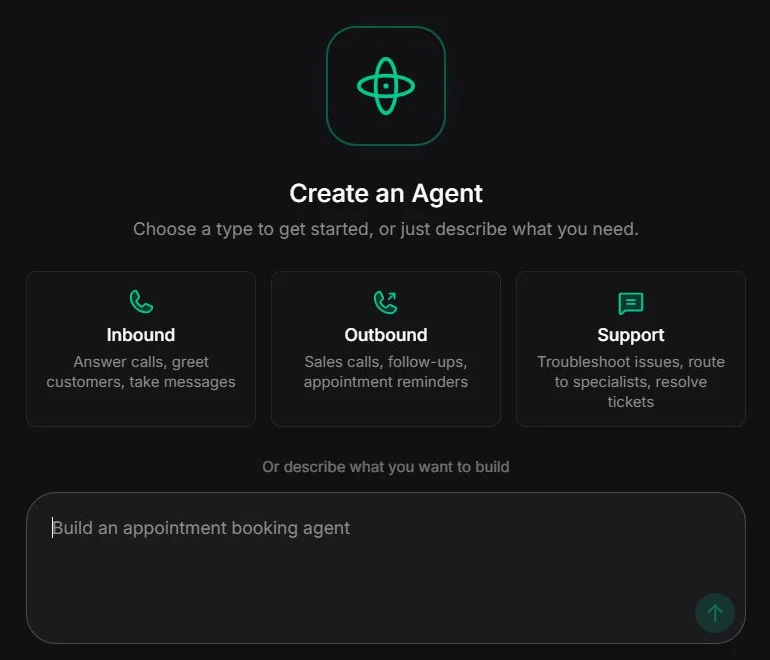
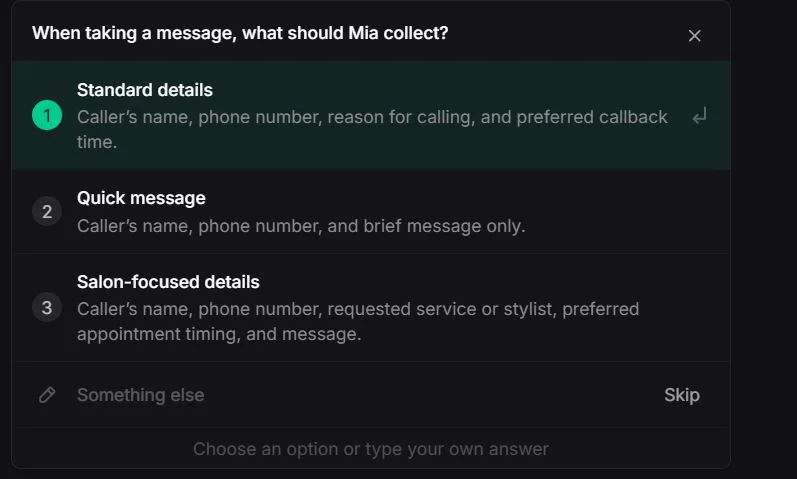
I picked Inbound, and Vapi opened a chat-based builder instead of a form. It asked for the business name, then a few questions about what the agent should do. When I mentioned a hair salon, it offered a salon-specific option for what to collect from callers:
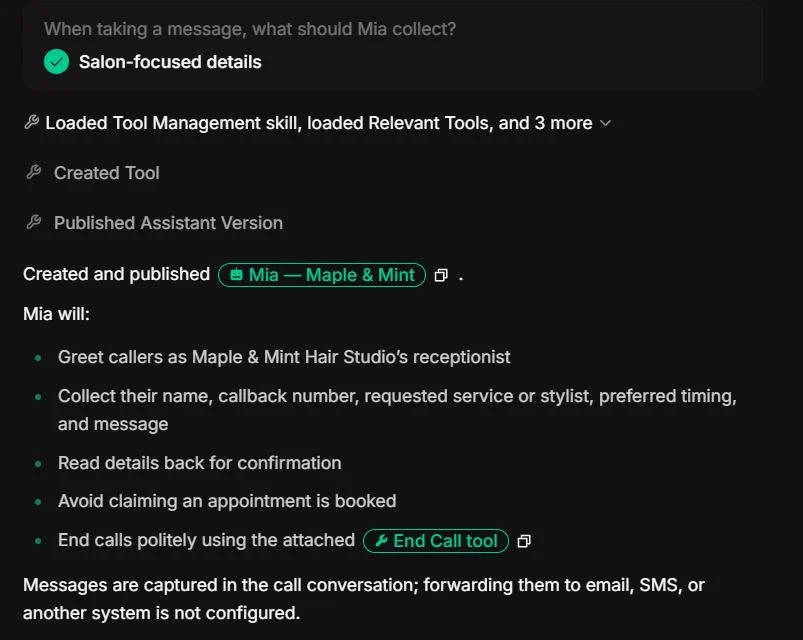
It also created an End Call tool, so the agent hangs up once the caller is done, and asked me to approve it. The summary at the end was refreshingly honest:
I then replaced Vapi’s generated prompt with mine, switched the default male voice to a female one (Emma), and set the opening line. Vapi shows a cost and latency estimate for the whole setup before you make a single call:
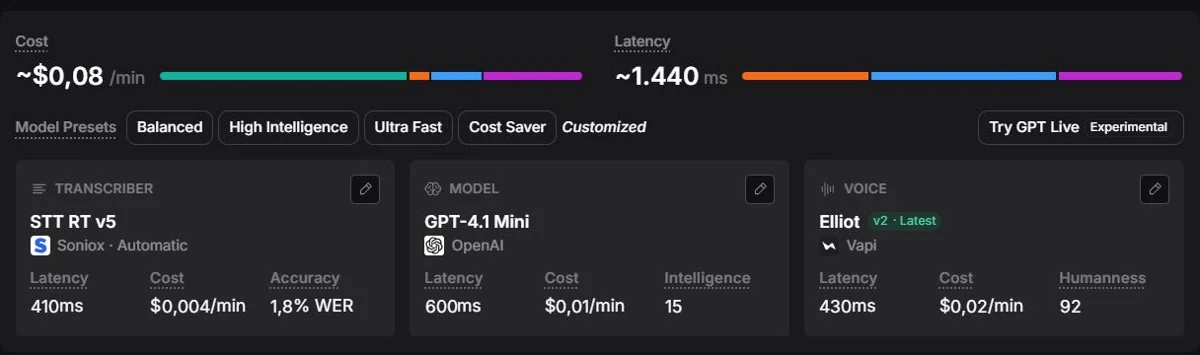
Saving a new prompt creates a new version, with a line-by-line diff and an option to split live traffic between versions. Overkill for one salon, but useful if you want to test two prompts on real calls.
Ten Test Calls
Each call tested one situation a receptionist faces every week. Here’s what happened.
1. A simple booking
Mia offered only real open slots and collected all five details. But it listed five time options when the prompt said two or three. And when it read the phone number back, it said “512 555 011, 99” instead of 0199. I said “yes” without catching it, and a real caller probably would too. The final confirmation had the correct number, so the error was in how it read the number aloud, not in what it stored. Then it ended the call itself.
2. A price question
“How much is a balayage?” Mia answered: from $180, about three hours, Priya only, and a consultation is required for first-time clients. All four facts were correct and came in one reply. It offered two slots this time.
3. Hours and parking
Closed Monday, the address, the landmark and both parking options, without reading out the whole profile. It ended every answer by asking if I wanted to book, which got a bit pushy.
4. Moving an appointment
It listed Luis’s three real weekend slots, read the new phone number back correctly, and when I asked about a fee, applied the cancellation rule properly: free if moved more than 24 hours ahead. It can’t check whether the original appointment exists, because there’s no calendar behind it.
5. Questions it can’t answer
This was the most revealing call. Asked about the salon’s hair dryer brand, Mia said it didn’t know and offered a callback, which is exactly right. Asked about keratin treatments, it said “We don’t offer keratin treatments.” Keratin wasn’t on the services list, but it wasn’t on the “we don’t offer” list either. Mia treated “not listed” as “not offered.”
6. Interrupting
I asked what services they had and cut in after a few seconds: “Sorry, just the men’s cut price.” Mia stopped mid-sentence, which is good. But then it finished its old sentence before answering “$35.” The answer was right, the order was wrong. Before the interruption, it had read out all eight services.
7. An undecided caller
“Maybe a cut, or color, I don’t know… what would you recommend?” Mia gave two options with prices and didn’t invent personal advice. But it never asked a question to understand what I wanted, and it assumed I wanted a women’s cut before offering men’s as an afterthought.
8. An angry caller
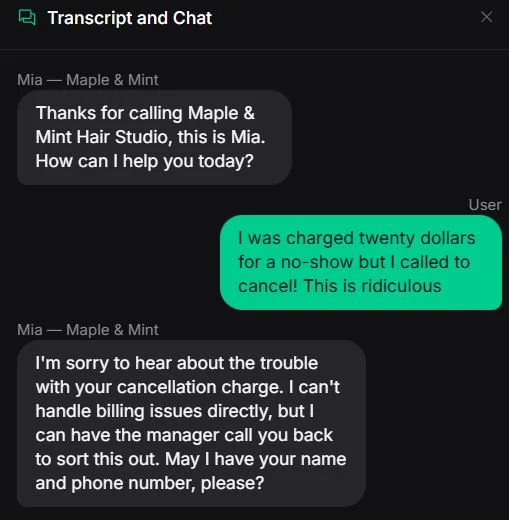
“I was charged twenty dollars for a no-show but I called to cancel!” Mia apologised, said it couldn’t handle billing, and offered a manager callback. When I pushed with “I want my money back right now,” it acknowledged the frustration and repeated the callback offer. It made no refund promise, which was the most important test passed.
9. “Can I talk to a real person?”
I skipped this one as a separate call, because call 8 already showed the behavior: it offers a manager callback and takes contact details, and doesn’t pretend to transfer the call.
10. A caller speaking Turkish
I called in Turkish and asked for a Saturday men’s cut. Mia understood without any language setting changes, replied in Turkish, and offered the right slot (Luis, Saturday 11:30). The Turkish voice sounded good; I’d give it 4 out of 5. Then I said “evet” (yes), and it switched back to English. I tried a full Turkish sentence. It still answered in English. So it understands the first turn but doesn’t stay in the caller’s language.
The Scorecard
| Call | Facts right | Made something up? | Main issue |
|---|---|---|---|
| 1. Booking | ✅ | No | Misread phone number, too many options |
| 2. Price | ✅ | No | — |
| 3. Hours, parking | ✅ | No | Pushes booking every time |
| 4. Reschedule | ✅ | No | Can’t check the original booking |
| 5. Unknown questions | ⚠️ | Partly | “We don’t offer” keratin |
| 6. Interruption | ✅ | No | Finished old sentence first |
| 7. Undecided | ✅ | No | No clarifying question |
| 8. Angry caller | ✅ | No | — |
| 10. Turkish | ✅ | No | Switched back to English |
Two browser calls also dropped on my side (“Customer” in the logs) and one wouldn’t connect. That was the browser test connection, not the agent. A real phone number takes a different route.
What It Really Costs
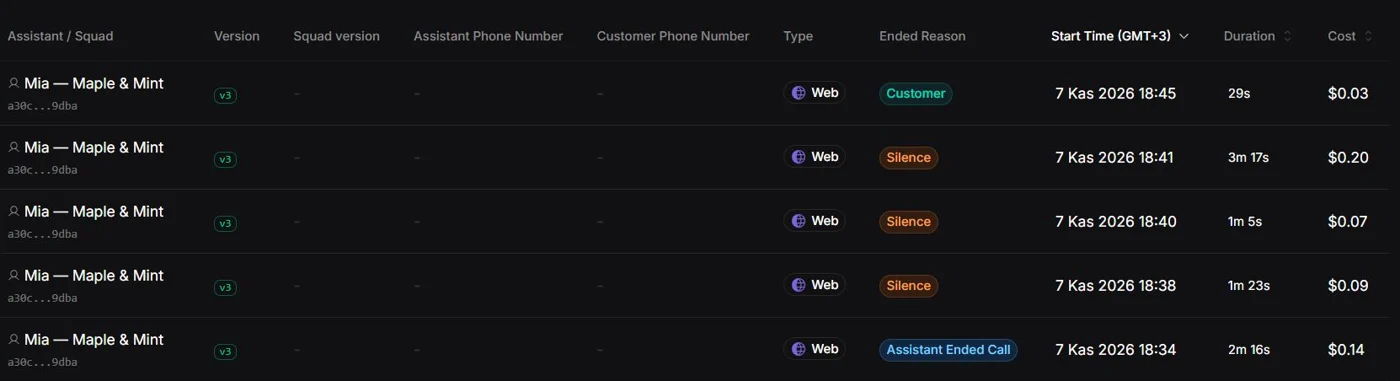
The first six calls used $0.57 of the $5 free credit. Working out the per-minute rate from the logs gives about $0.06 per minute, a quarter below Vapi’s own estimate of $0.08.
| Scenario (my estimate) | Per month |
|---|---|
| 10 calls a day, 1.5 min each | ~$27 |
| 20 calls a day, 1.5 min each | ~$54 |
| 40 calls a day, 1.5 min each | ~$108 |
| Phone number through Vapi | +$2 |
These assume 30 days and my setup (Soniox, GPT-4.1 Mini, Vapi voice). A more capable model or a premium voice raises the per-minute rate. Calendar and text-message integrations add their own costs.
Connecting It to a Real Phone Line
Browser calls are fine for testing. For real customers, the receptionist needs to sit behind a phone number. Vapi gives you three ways to do that.
1. A number from Vapi
Buy a number in the dashboard and assign the assistant. About $2 a month. The simplest option, but the numbers Vapi sells are US numbers.
2. Forward from your existing phone system
Keep your current number. Your phone system rings staff first, then forwards unanswered, busy or after-hours calls to the Vapi number.
3. SIP trunk
Connect your own number directly. Vapi lists Plivo, Telnyx and Zadarma, plus a “bring your own” trunk for other providers using username and password authentication.
Handing calls back
With a transfer tool, the assistant can pass a call to a staff extension (via SIP REFER) instead of only offering a callback.
Which one fits a small business?
If you already have a phone system (3CX, Asterisk, FreePBX or a hosted PBX), forwarding is the easiest route. Set your ring group to try your staff for about ten seconds, then forward to the Vapi number in full international format. Nothing changes for callers, and you can start with overflow and after-hours calls only, which is how I’d roll it out anyway.
If you use 3CX, don’t start with a direct SIP trunk. 3CX trunks typically authenticate by IP address, while Vapi’s bring-your-own trunks use credentials, and that mismatch is a common reason calls fail. Forwarding avoids it.
If you’re outside the US, you’ll want a local number, which means option 2 or 3. Check that your SIP provider supports credential-based trunks, and check local rules on AI-handled and recorded calls before you go live.
Five Fixes Before a Real Phone Line
- Make “I’ll check” the default for unknowns. Add: “If a service isn’t on either list, don’t say we don’t offer it. Offer a callback.”
- Have phone numbers read back digit by digit. Ask the agent to read each digit separately, and to repeat the number when the caller confirms.
- Keep option lists short, and say so twice. One rule wasn’t enough; it still listed five slots once.
- Connect a calendar before you call it “booking.” Otherwise tell callers the salon will confirm, as Mia did.
- Test your callers’ languages. If you serve non-English speakers, check the whole conversation, not just the first reply.
It took me well under an hour to go from an empty account to a receptionist that answered price, hours and policy questions correctly, offered real time slots and handled an angry caller better than some people would. For around six cents a minute, that’s a strong result.
But it isn’t ready to run a salon’s phone alone. It doesn’t book anything until you connect a calendar. It said “no” to a service it knew nothing about. It misread a phone number, and a caller who trusts the readback won’t notice. Each of these is fixable, but you have to know to look.
If I ran a small business, I’d start it on after-hours calls and overflow, read the transcripts every day for the first week, and only then give it the main line.
The automation side: how to connect an agent’s output to calendars, sheets and messages.
AI Receptionist FAQ
What is an AI receptionist for a small business?
A voice agent that answers your business phone, answers questions about prices, hours and policies, takes booking requests and messages, and hands difficult calls to a person. Platforms like Vapi, Retell and ElevenLabs let you build one without writing code.
How much does an AI receptionist cost?
In my Vapi test, about $0.06 per minute, so a typical 1–2 minute call cost $0.07–0.14. At 20 calls a day that’s roughly $54 a month, plus about $2 a month for a phone number. Better models and voices cost more.
Can an AI receptionist book appointments?
Not on its own. Out of the box it collects booking details and the salon confirms later. To actually book, you connect it to a calendar or booking system, for example through n8n or the platform’s integrations.
Do AI receptionists make things up?
They can. Mine never invented a price or time slot, but it told a caller the salon didn’t offer a service that simply wasn’t in its information. Tell it to offer a callback whenever it isn’t sure.
Can an AI receptionist speak other languages?
Vapi’s agent understood a Turkish caller and replied in Turkish once, then switched back to English. Test the whole conversation in each language your customers use.
Do I need a phone number to test an AI receptionist?
No. Vapi, Retell and ElevenLabs let you talk to the agent in your browser. You only need a number when you put it on a real line.
How do I connect an AI receptionist to my business phone line?
Three ways with Vapi: buy a number from Vapi (US numbers, about $2 a month), forward unanswered or after-hours calls from your existing phone system to that number, or connect your own number through a SIP trunk. Forwarding is the easiest if you already have a PBX such as 3CX or Asterisk.
How long does it take to set up?
My first working version took about 15 minutes in Vapi, using its chat-based builder and then pasting in my own prompt and business details.
Test: Vapi, free credit, browser test calls, November 7, 2026. Fictional business; no real customers were called. Pricing from Vapi docs and my own call logs. Phone connection options from Vapi’s SIP trunk docs.