
Agentic AI with n8n: Build Autonomous Workflows That Actually Work (2026 Guide)
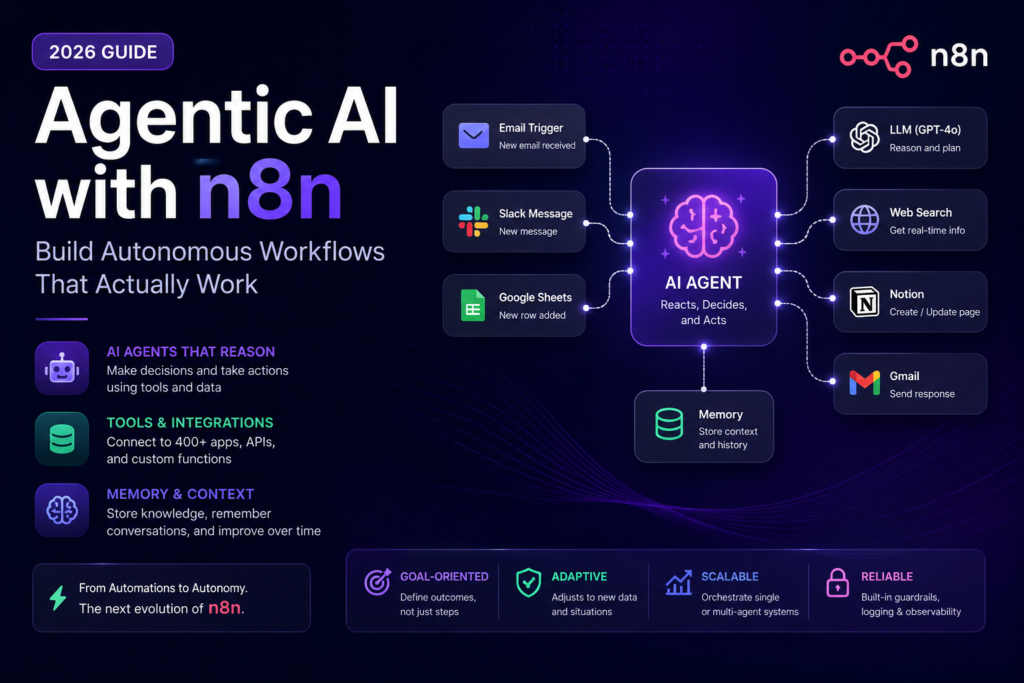
Agentic AI workflows in n8n use a language model as a reasoning engine — not just a text generator. The agent receives a high-level goal, selects which tools to call, processes results, and loops until the task is complete. This guide covers the four core concepts, a six-step build process, real-world use cases, and the failure points that tend to surface once workflows go live.
Last year I was building a support triage system for a mid-sized e-commerce client. The brief was straightforward: read incoming emails, classify urgency, draft a reply. Three If nodes, two HTTP calls, done in an afternoon. It worked fine for two weeks.
Then a customer wrote in Turkish. The classifier returned null. The entire workflow silently routed the message to a catch-all bucket that nobody checked. The customer waited four days for a response on a billing issue.
That’s the failure mode of traditional automation — not dramatic crashes, just quiet misdirection whenever reality stops matching your assumptions. The fix wasn’t adding another If node. It was switching to an architecture where the system could actually read the email, figure out what the person wanted, and decide what to do next. That’s what LLM-driven automation in n8n actually solves — and this guide is my attempt to document how it works without making it sound more elegant than it is in practice.
📚 Related Guides on AIFlowMatrix
What Is Agentic AI in n8n?
Agentic AI in n8n refers to workflows where a language model acts as a reasoning engine: it receives a goal, selects the appropriate tools, executes actions, evaluates results, and continues iterating until the task is complete — without requiring predefined logic for every possible input. Unlike standard n8n flows where every branch is hardcoded, an agentic workflow lets the LLM determine the execution path dynamically.
The 4 Core Concepts Behind Agentic AI Workflows
These four properties separate a real AI agent from a glorified If/Switch chain. All four need to be present:
AI Agents vs. Classic n8n: Where the Differences Actually Matter
The honest version: traditional n8n is still better for a lot of things. Faster, cheaper, easier to debug. Here’s where the tradeoffs actually land:
| Dimension | Traditional n8n Workflow | Agentic AI Workflow |
|---|---|---|
| Decision logic | Hardcoded branches (If/Switch nodes) | LLM reasons through options dynamically |
| Error handling | Catches predefined errors, stops or alerts | Agent self-corrects, retries with a different approach |
| Unstructured data | Requires pre-processing; brittle with format changes | Parsed natively by LLM — flexible by default |
| Tool selection | Fixed sequence of nodes defined upfront | Agent picks which tool to call based on context |
| Memory | Stateless per execution | Buffer memory, vector store, or session state |
| Multi-step reasoning | ❌ Not supported | ✅ Native via ReAct / chain-of-thought |
| Build complexity | Lower — visual node mapping | Higher — requires prompt engineering and tool design |
How to Build Your First Agentic AI Workflow in n8n (Step by Step)
Steps get skipped. Workflows break. I’ve done it wrong enough times that this order is now non-negotiable for me:
-
1Define the Goal, Not the Steps
Write the agent’s objective in plain English before opening n8n. Poor framing: “Fetch email → extract data → update sheet.” Better framing: “Monitor support inbox, classify tickets by urgency, draft replies, and escalate critical issues to Slack.” The agent determines the execution path — the goal definition is your primary design task.
-
2Add the AI Agent Node (LangChain)
In n8n, drag in an AI Agent node (found under the LangChain section). Connect it to your preferred chat model — GPT-4o, Claude Sonnet, or Gemini Flash are all well-tested options. Configure the system prompt here: define the agent’s role, output format expectations, and explicit constraints. The n8n LangChain documentation covers every available node in detail if you want a full reference while building.
-
3Connect Your Tools
Attach sub-nodes as tools: HTTP Request (for any API), Code node (for custom transformations), Google Sheets, Gmail, Slack, Notion — whatever the agent needs to call. Each tool requires a clear, specific description. The LLM decides which tool to invoke based entirely on that description text.
-
4Add Memory
Connect a Window Buffer Memory node for conversation context within a session. For persistent knowledge across executions, use a Vector Store node backed by Pinecone, Qdrant, or n8n’s built-in store. Without memory, every agent run starts from scratch — acceptable for single-shot tasks, problematic for anything requiring context continuity. n8n’s memory node documentation covers the tradeoffs between each option.
-
5Test With Boundary Inputs First
Don’t test with your ideal scenario. Start with the worst inputs you can think of: an empty message, malformed JSON, content in an unexpected language. We learned this the hard way after a malformed JSON response brought down an otherwise stable support workflow in its first week live. Testing edge cases before launch is dramatically less painful than debugging them in a live environment.
-
6Add Human-in-the-Loop for High-Stakes Decisions
Not every decision should be fully autonomous. Use n8n’s Wait node combined with a webhook to pause execution and request human approval before sending bulk emails, making purchases, or updating live databases. Route only uncertain or high-risk cases to humans — let the agent handle the well-defined routine ones.
Sample System Prompt for a Support Triage Agent
A system prompt structure used across several support automation deployments — the specificity of the output format requirement is what makes downstream nodes reliable:
What This Looks Like in Practice: Six Patterns Worth Stealing
A few patterns worth stealing. None of these are novel — they’re just the ones that actually held up past the first week in real environments:
📊 Where AI Orchestration Actually Helps (Honest Take)
Opinionated ratings based on internal testing and client work — your mileage will vary depending on data quality and prompt design.
These systems will occasionally do something completely unexpected and confidently wrong. Not often — but it will happen. The answer isn’t to avoid building them; it’s to log every agent decision to a database, set up alerts for output patterns that look off, and never let an agent write to a live system without at least one human-reviewable audit trail. Autonomous doesn’t mean unsupervised.
What Goes Wrong (And It Will Go Wrong)
max_iterations in the AI Agent node. In practice, 10–15 iterations covers the full range of legitimate task complexity for most business workflows.
When One Agent Isn’t Enough: Chaining Agents in n8n
Single agents handle a lot. But there’s a ceiling — and you usually hit it when the task has multiple distinct phases that require different reasoning styles. Research and writing, for instance, don’t benefit from the same model behavior. A research pass wants thoroughness and citation. A writing pass wants concision and voice. Asking one agent to switch between those modes mid-task is where you start seeing inconsistent output.
The answer is multi-agent workflows — chaining specialized agents so each one handles the phase it’s suited for. In n8n this is straightforward: route the output of one AI Agent node as the input of the next. A common four-stage pattern for content and research automation:
Does it always work better? No. For short, well-defined tasks a single agent is fine. But when you start noticing that your one-agent flow produces good output sometimes and mediocre output other times, inconsistency is almost always the symptom of trying to do too many different things in a single context window. Splitting the task usually fixes it.
Frequently Asked Questions
Final Verdict: Is Agentic AI Worth Building in n8n?
Short answer: yes — when the problem actually calls for it. Agentic AI in n8n is genuinely useful for tasks with variable inputs, multi-step reasoning, or data that doesn’t arrive in a predictable format. For high-volume processes where every input looks the same, standard n8n flows are still the better choice — cheaper to run, easier to debug, and less likely to surprise you at 2am.
The workflows that benefit most from agents are the ones you’ve tried to build with traditional automation and kept finding new edge cases to patch. If you’ve been adding If nodes for three weeks and the workflow still breaks, that’s usually the signal to switch architectures.
The mental shift that actually matters: stop designing the path and start designing the goal plus the guardrails. That’s a different skill than traditional automation, and it takes a few broken workflows to internalize. But once it clicks, you’ll find yourself looking at your old If-node spaghetti and wondering why you spent so long patching edge cases instead of just handing the problem to something that could read.
Key Takeaways
- Agentic AI workflows use an LLM as a reasoning engine that selects tools and determines execution paths dynamically — not a static decision tree.
- n8n supports agentic patterns natively through the AI Agent node (LangChain), with built-in support for tool calling, memory, and structured output.
- Tool descriptions are the most overlooked factor in agent reliability — write them with the specificity of API documentation.
- Human-in-the-loop checkpoints remain critical for high-stakes decisions, even in highly autonomous AI orchestrations.
- Multi-agent architectures improve output quality by assigning specialized agents to each stage of complex tasks.
- Always enforce structured output formats and set iteration limits before any agent goes live.
One Comment