
What Is Jev AI? Practical Use Cases and a Developer’s Guide
Facts in this guide were checked against TypeSafe’s website and documentation on September 22, 2026. Jev is in early access, so prices, rate limits, and model versions may change.
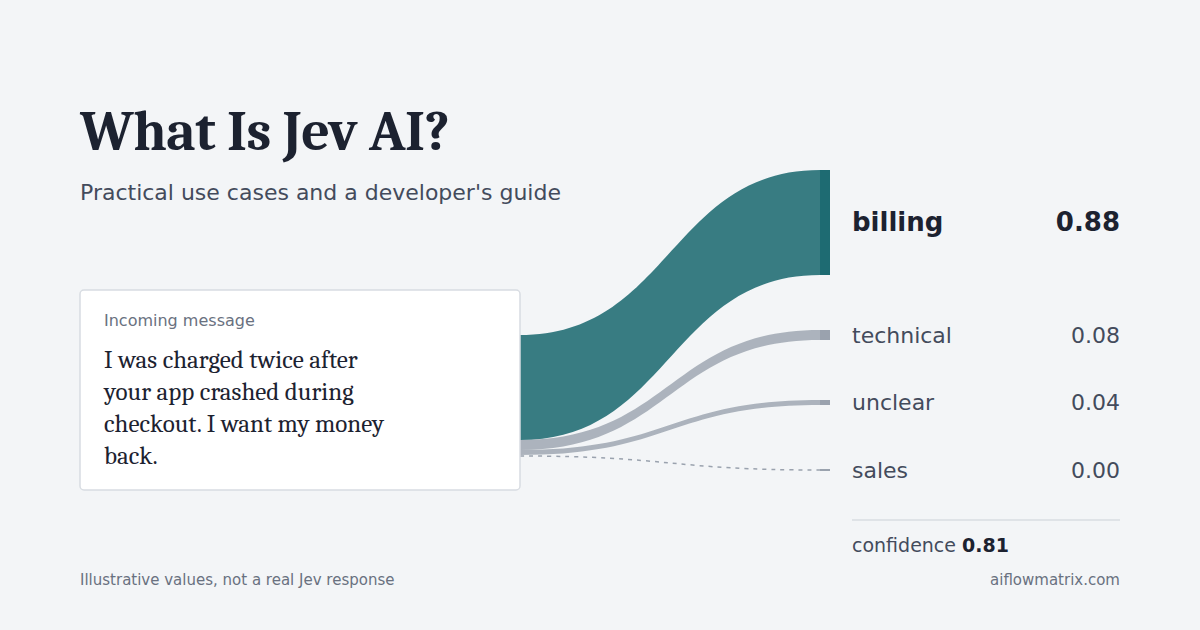
Jev AI is a model from TypeSafe AI that makes one narrow kind of judgment inside software: given some content and a list of answers you defined, it picks among them and tells you how the probability is spread. A single customer message shows what that means in practice.
Incoming message
I was charged twice after your app crashed during checkout. I want my money back.
Choice question you define
Which team should handle this?
What Jev AI actually does
Handling the message above takes more than one job. Something has to read it, decide which team should handle it, write a reply, and then act, for example by opening a ticket in the billing queue.
Jev does only the second job. You send the message and the options you defined, such as billing, technical, sales, and unclear. Jev returns one of those options, a probability for each, and a confidence value. It does not read your inbox, write the reply, or move the ticket. Your software does those things and uses Jev’s answer as one input, which is how the official introduction frames it too.
TypeSafe calls Jev a “System One model.” That is the company’s own label for the category. According to the launch post, it borrows from Daniel Kahneman’s distinction between fast, intuitive thinking and slow, deliberate reasoning. Read it as a naming choice and a design goal, not as evidence of how the model works internally. TypeSafe describes a new architecture, sampler, and training method it calls Reinforcement Learning for Calibrated Decisions (RLCD), without enough published detail for outside verification. Jev launched in early access on September 15, 2026.
Can you try Jev AI without writing code?
Yes, in one way. TypeSafe runs a Playground inside its console. You paste text as the state, add questions, and see the answers. The Quick start walks through it with a support message and the question “Does this message express urgency?” You need an account, and access currently goes through early access.
Keep the Playground, a finished app, and the API apart:
- The Playground shows whether Jev’s judgments match yours on your own examples. Nothing gets automated there.
- A ready-made end-user app, such as a helpdesk plugin, is not something TypeSafe offers according to its official sources. Third-party integrations are other companies’ products.
- The API is where the automation happens, called by a developer or by any no-code platform that can send HTTP requests.
Example workflows
These workflows are designs to show the pattern. None of them comes from a real deployment or test.
Routing customer requests to the right team
- Incoming information
- The text of an email or contact form submission.
- Question to Jev
- “Which team should handle this?” with
billing,technical,sales,returns, andunclear, each with a one-line description. - Possible decision
billing, with most of the probability on that option.- What the software does
- Assigns the ticket to the billing queue and logs Jev’s full answer.
- If it’s uncertain
- Confidence below your threshold, or an
unclearanswer, sends the ticket to a person for manual triage.
Prioritizing incoming work requests
Once the routing pattern is clear, the same shape handles priority. Take an internal request: “The shared drive is read-only for the whole finance team and month-end closes tomorrow.” Instead of one question, ask two. A Score rates urgency on levels you write, from “can wait a week” to “work is stopped now,” and a yes/no question asks whether the problem blocks more than one person. Neither answer is the priority. Your code combines them with a rule you own, so when the business decides that anything blocking a whole team jumps the queue, you change a line of code, not a prompt. A spread-out score or a borderline yes/no goes to a coordinator.
Choosing the next step in an automation
Here the state is structured data rather than a message: a completed onboarding form plus the list of documents already uploaded. The question is “What should happen next?” with send_welcome_pack, request_missing_documents, schedule_call, and hand_to_operations. If Jev picks request_missing_documents, the workflow sends a templated email and pauses. The email comes from your system or a generative model; Jev only chose the branch. Cases it can’t call clearly go to operations rather than being guessed.
When Jev AI fits, and when it doesn’t
Not every decision needs a model. A useful test is whether you can write the rule down exactly.
If orders over $5,000 need manager approval, that is if amount > 5000. A model adds cost, latency, and a chance of error to something code already does perfectly. TypeSafe’s own limitations page for Jev 1.13 goes further: it says Jev is not a calculator, does not count reliably, and reads dates as text rather than as ordered values. It recommends keeping arithmetic and date comparisons in code.
Free-written messages are a different problem. “I can’t get in,” “your login page hates me,” and “locked out again after the reset email never came” mean roughly the same thing, and no keyword list covers every phrasing.
| Hand-written rules | Classic trained classifier | General LLM with structured output | Jev | |
|---|---|---|---|---|
| Best when | The condition is exact and stable | You have many labeled examples and fixed categories | You also need generated text, or multi-step reasoning | Categories are known but inputs are free-form |
| Varied language | Breaks on phrasings you didn’t anticipate | Good within its training data | Strong | Good in English; other languages less tested |
| Output | Exactly what you coded | A label, often with a score | Text or JSON you must validate | Only options you defined, with probabilities |
| Changing categories | Edit code | Relabel and retrain | Edit the prompt | Edit the question definition |
| Maintenance | Grows with every edge case | Training pipeline and data upkeep | Prompt drift, parsing, retries | Question wording, threshold tuning, version pinning |
| When it’s wrong | Wrong in predictable, reproducible ways | Wrong on unfamiliar input, often confidently | Can return malformed or off-topic output | Returns a valid option that may still be wrong |
| Speed and cost | Effectively free and instant | Cheap once trained | Slowest and most expensive of the four | Vendor claims large savings over LLMs |
The two model-based columns often end up in the same system: Jev decides what kind of request something is, and a generative model writes a reply only when one is needed.
How Jev AI works for developers
State is the content Jev evaluates. Per the API reference, it can be a string, a JSON object, or an array. Example: {"message": "I was charged twice. Please refund the duplicate charge."}
Questions are a map of named questions you define. The names are yours and are not sent to the model. Every question in a request is evaluated against the same state, in parallel and independently.
Choice picks one option from a list you provide, up to 255 options, each with a description. The answer includes choice (the highest-probability option), probabilities for every option (summing to 1), and confidence. Example: which team handles this ticket. See the Choice docs.
Score rates the state on 2 to 10 ordered levels you describe. The score is probability-weighted, so it can land between levels, such as 1.05. The answer also carries per-level probabilities, a legend mapping level numbers to your descriptions, and confidence. Example: how frustrated the customer is, from “calm” to “very angry.”
Noul is TypeSafe’s name for a yes/no question. It returns one number, noul, from 0 to 1: the probability that the answer is yes. The Noul docs stress that this is not a measure of degree. “Is the candidate strong in Python?” tells you how likely “strong” is, not how strong. For degree, use a Score.
Probability, confidence, and the Noul value mean different things, and mixing them up leads to bad code. A probability belongs to one option or level. Confidence, on Choice and Score only, summarizes how concentrated the distribution is; the Confidence page explains that it is computed from the probabilities, reaching 1.0 when everything sits on one option. A Noul has no separate confidence, because its single yes-probability already describes a two-outcome distribution. The limitations page also warns against reusing a Noul threshold on a Choice.
The routing scenario in code
Carrying the support ticket into code: the message goes in as state, the teams become a Choice with an explicit way out (unclear), and the app acts only on confident answers. Everything else goes to a person, and every decision is logged.
The official Python SDK is typesafe-sdk and requires Python 3.10 or newer. It reads TYPESAFE_API_KEY from the environment and calls POST https://api.typesafe.ai/v1/systemone, according to the Quick start.
Not run. Class, method, and exception names follow the SDK reference. Helper functions and thresholds are placeholders.
from typesafe_sdk import Choice, Noul, TypeSafeClient, TypeSafeError

ROUTING_QUESTIONS = {
    "team": Choice(
        instructions="Which team should handle this customer message?",
        criteria={
            "billing": "Charges, invoices, duplicate payments, refunds of money already paid",
            "technical": "Bugs, error messages, features or integrations that do not work",
            "sales": "Pricing, plans, and questions from people who have not bought yet",
            "returns": "Sending back or exchanging a physical item",
            "unclear": "The message does not contain enough information to pick a team",
        },
    ),
    "wants_human": Noul(
        instructions="Is the customer asking to speak with a person?",
    ),
}

# Placeholders. Set these from your own labeled examples and the cost of a wrong route.
MIN_ROUTING_CONFIDENCE = 0.7
LIVE_AGENT_THRESHOLD = 0.8

# Pin a version if you tune thresholds. Reuse one client in a real service.
client = TypeSafeClient(model="jev-1.13.0", timeout=3.0)


def route_ticket(ticket_id: str, message: str) -> None:
    try:
        response = client.system_one(
            state={"message": message},
            questions=ROUTING_QUESTIONS,
        )
    except TypeSafeError as exc:
        # API error, timeout, or connection failure: the ticket still has to go somewhere.
        log_failure(ticket_id, exc)
        send_to_manual_queue(ticket_id, reason="decision_service_unavailable")
        return

    team = response.answers["team"]
    wants_human = response.answers["wants_human"].noul

    # Log everything, including the version that answered, for audits and retuning.
    log_decision(ticket_id, response.model, team.choice, team.confidence,
                 team.probabilities, wants_human)

    if team.choice == "unclear" or team.confidence < MIN_ROUTING_CONFIDENCE:
        send_to_manual_queue(ticket_id, reason="low_confidence")
        return

    assign(ticket_id, team=team.choice)
    if wants_human > LIVE_AGENT_THRESHOLD:
        flag_for_live_agent(ticket_id)
Illustrative response. Field names follow the API reference; the values are invented.
{
  "model": "jev-1.13.0",
  "answers": {
    "team": {
      "type": "choice",
      "choice": "billing",
      "confidence": 0.81,
      "probabilities": {"billing": 0.88, "technical": 0.08, "sales": 0.0, "returns": 0.0, "unclear": 0.04}
    },
    "wants_human": {"type": "noul", "noul": 0.12}
  },
  "usage": {"input_tokens": 410, "output_tokens": 40}
}
Handling failures. The API returns 401 for a bad key, 422 for an invalid request, 429 for exceeded rate limits, and 529 when TypeSafe is overloaded. The SDK retries 429 and 529 with backoff by default, so one call can take longer than a single request’s timeout. If your workflow has a hard latency budget, configure retries to match. On failure, fall back to the manual path, as the example does, rather than dropping the ticket.
Pin the model version. The Models page explains that jev-latest moves when a new release ships, which can change answers without any change on your side. Once you have tuned thresholds, pin a versioned ID such as jev-1.13.0 and upgrade on your own schedule.
Ask several questions at once. Because questions run in parallel, you can ask for team, tone, and refund intent in one call. The docs call this speculative fan-out: ask questions you might need and let your code ignore answers that don’t apply. Each extra question still adds input tokens.
Why a valid answer isn’t the same as a correct decision
The homepage headlines “Zero Hallucinations,” and the launch post says matching the defined schema is guaranteed.
The narrow version holds up: Jev will never invent a team called accounts_receivable_urgent or return malformed output. That solves a formatting problem, not a correctness problem. The model can still pick the wrong option, and your list itself can be incomplete.
Two options only
sales, technical
The crash mention pulls the probability to technical. Confidence looks high, and the refund lands with engineers who can’t issue one.
Complete options plus a check
billing, technical, sales, unclear, and a separate Noul
Noul “Is the customer asking for money back?” 0.96
Billing gets the ticket. Technical’s real share can trigger a copy to engineering, and the refund Noul is caught independently of the team list.
Probabilities across a Choice’s options always sum to 1, so Jev has to spread its judgment over the options it has. Confidence measures how concentrated that spread is. It says nothing about whether any of the options fits the request. What lowers the risk:
- An escape option. The Choice docs recommend
otherornone of the abovewhen the list might not cover every input;uncleardoes the same for messages that are too vague. - An absolute check beside the relative one. A Choice settles which option fits best. A Noul judges one option on its own and can come back low even when that option would win the Choice.
- Human review where mistakes are expensive, such as refunds and account closures.
Setting the threshold
TypeSafe’s docs decline to give a universal number, and so does this guide. The Noul docs offer the working rule: raise the threshold when acting on a false yes is expensive, lower it when missing a true yes is expensive. Set it from labeled examples and the price of each kind of mistake; “show a help article” can tolerate a far lower bar than “issue a refund.”
How to evaluate Jev AI’s speed and cost claims
193.6x faster and 444.6x cheaper than LLMs, based on the company’s own workflow evaluations, with end-to-end response times of 70–500 ms.
The launch post is candid about their limits: the team built the workflows, reference answers come from averaging two frontier LLMs, the headline figures are expected to sit at the high end of real-world gains, and the evals were generally run from laptops on the US West Coast, where the service is based.
What matters for your system is end-to-end time: the network round trip, which grows with distance from the US West Coast, plus preparing the state, lookups, retries, and human review for low-confidence cases. A 200 ms model call inside a workflow where 15% of cases wait hours in a review queue does not make the workflow 200 ms.
Pricing and a transparent estimate
The Models page lists Jev 1.13 at $0.042 per million input tokens, or $42 per billion. Output tokens are free. The launch post adds that TypeSafe cannot prove the price isn’t subsidized and expects prices to go down rather than up.
Monthly cost (USD) = requests per day × input tokens per request × 30 × price per million tokens ÷ 1,000,000
A worked example, with its assumptions stated: 20,000 support messages a day, one request per message, and about 600 input tokens per request. The token figure is an assumption. The documented examples report 328 to 589 input tokens for short tickets with one to five questions, far more than the ticket text alone, which suggests question definitions count toward input. Check usage.input_tokens on your own requests. At those numbers, 360 million input tokens a month comes to about $15.12 in model fees.
Estimate your monthly model fee
What the estimate leaves out usually matters more: building and maintaining the integration, staff time on reviewed cases (likely larger than the model bill), hosting and monitoring, wrong decisions that slip through, and any intermediary platform’s fees.
Rate limits and context. The Models page lists 250,000 tokens per second and 1,200 requests per minute, with a warning that limits are adjusting dynamically and can change without notice. Higher limits are offered on custom and enterprise plans. Context is capped at 64k tokens per request, and 32k tokens for the state plus the single longest question.
Can Jev AI run on your own servers or offline?
“Running it yourself” can mean several different things, and official sources answer each one differently.
| Question | Answer | What that means |
|---|---|---|
| Your application on your own server | Yes | Your code can run anywhere, but every Jev call still travels over the internet to TypeSafe’s hosted API. A self-hosted app calling a cloud API is not a closed system. |
| The model on your own server | Not documented | The Models page says the same weights serve every account. No official self-hosting option, downloadable weights, or container image appears in official sources. An inspectable SDK is not the same as open model weights. |
| Working without internet | Not documented | No official offline setup exists in the sources reviewed. |
| Private network or dedicated deployment | Could not verify | TypeSafe mentions custom and enterprise plans, for higher rate limits, and zero data retention for enterprise customers. Anything beyond that is a question for sales. |
Community projects have appeared quickly. HelixML describes running Kev, a small open model that imitates the System One request format, on its own GPU server. Another project, jeff, offers a self-hosted server with the same wire format built on a different encoder model. They copy the API shape, not the model, so their accuracy and calibration are their own. The SDK’s custom base_url setting is how they plug in; it does not make them an official self-hosted Jev.
TypeSafe’s own open-source system-one-adapter-python, linked from the launch post, does something else: it gets System One-style decisions out of general LLMs, and TypeSafe used it for its comparisons.
Platforms such as Netlify also offer Jev through their AI gateways. Your data then passes through the gateway provider as well as TypeSafe, so review both sets of terms.
Data handling and language
The Models page says Jev is not trained on customer requests or responses, and the Legal page offers zero data retention to enterprise customers. The DPA, last updated April 24, 2026, commits to notifying customers of security incidents within 72 hours but states no specific retention period for standard accounts, and none could be verified elsewhere.
English is Jev’s primary training language and where accuracy is best, according to the Models page. Other languages are handled, but not equally well, and TypeSafe recommends testing on your own content before relying on Jev for a non-English workload.
What to measure in a first Jev AI pilot
A small pilot on your own data tells you more than any vendor benchmark. What follows is a method to adapt, not a record of a test.
Build an evaluation set from real work. Pull 200 to 500 recent requests, strip sensitive details, and have the people who do the job today label the correct decision. Where two of them disagree, note it; that shows how ambiguous the task is even for humans.
Include the hard cases on purpose. Random samples underrepresent them: vague messages (“it’s broken again”), two intents in one message, missing information, and every language you actually receive.
Compare against a baseline. Run the same set through what you use now. Without it, “85% correct” says nothing about improvement.
Measure more than accuracy. Track the correct routing rate on cases handled automatically, critical errors that would have caused real harm, the share of cases sent to review at your chosen threshold, end-to-end latency measured from your own servers, and actual cost per request from the usage field.
Try several thresholds on the same data. Each one trades review rate against error rate, and choosing the point on that curve is a business decision.
Run in shadow mode before going live. Let Jev decide alongside your current process without acting, log both, and study the disagreements. Automate the lowest-risk decisions first.
Quick answers about Jev AI
Is Jev AI a chatbot?
No. Jev does not generate text. It answers yes/no, multiple-choice, and scored questions you define about content you send, and returns probabilities.
Can I use Jev AI without coding?
You can test it in TypeSafe’s Playground after signing in. Using it in a real workflow requires an API integration, built by a developer or an automation platform that can send HTTP requests.
Does Jev AI hallucinate?
It always returns one of the options you defined, so it cannot produce malformed or invented output. It can still choose the wrong option, and an incomplete option list can make a wrong answer look confident.
Can Jev AI run offline or on my own servers?
Not according to official sources as of September 22, 2026. Jev is available through TypeSafe’s hosted API. Community projects that copy its request format use different models.
Main sources: TypeSafe AI, Jev documentation, launch post, Models, API reference, Jev 1.13 limitations, Legal.
Written by Yavuz Yasin Çetinkaya. Last verified September 22, 2026.