
Julius AI Explained: How It Works and How It Compares to ChatGPT, Claude, and Gemini

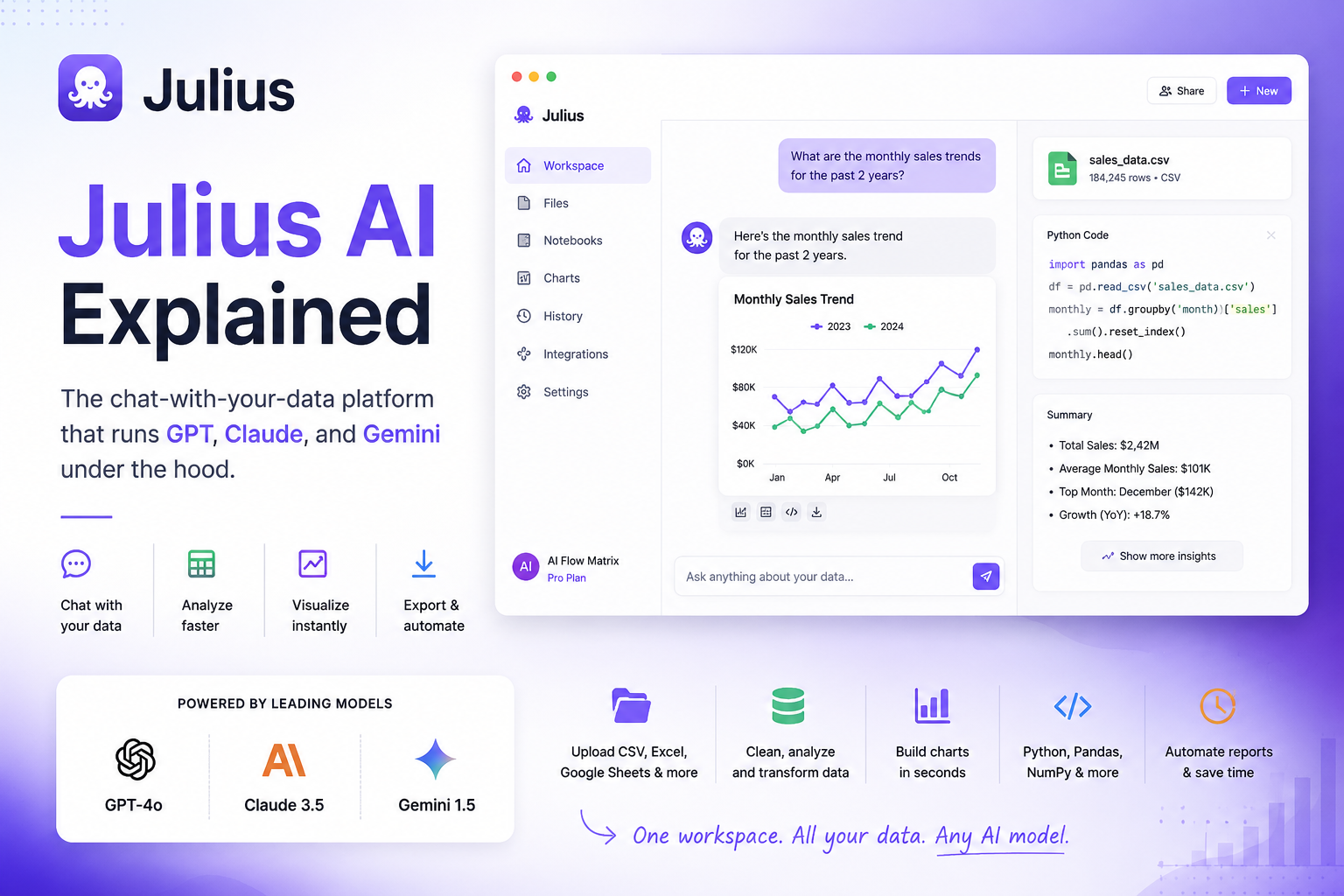
Julius AI is a chat-with-your-data platform that lets you upload spreadsheets, CSVs, or connect databases and ask questions in plain English — it writes Python or R behind the scenes and returns charts, tables, and statistical results. Under the hood, it routes tasks across GPT, Claude, and Gemini depending on which model performs best for that specific analysis. Pricing starts free (15 messages/month), with the working tiers at $20 Plus, $45 Pro, and $200 Max. If you already pay for ChatGPT Plus, Claude Pro, or Gemini and use them for data work, the honest question isn’t “is Julius better?” — it’s “is Julius’s data-specific UX worth the extra subscription?” This guide answers that directly.
- Category
- AI data analysis platform
- Best for
- Non-technical analysts
- File types
- CSV, Excel, JSON, PDF, images
- Live connectors
- Postgres, Snowflake, BigQuery
- Underlying models
- GPT, Claude, Gemini (mixed)
- Code language
- Python & R (auto-generated)
- Free plan
- 15 messages/month
- Paid plans
- $20 – $200/mo (individual)
- Last verified
- July 2026
- 1What Julius AI actually does — and what it doesn’t
- 2How it works: the “chat-with-your-data” pattern under the hood
- 3Which models Julius uses — GPT, Claude, and Gemini in the same product
- 4Julius AI pricing, plan by plan (2026 numbers)
- 5Julius vs. ChatGPT vs. Claude vs. Gemini Flash — full comparison
- 6Where Julius wins, where using the raw models wins
- 7My take from using it on real datasets
What Is Julius AI?
Julius started as a simple spreadsheet chat tool. Upload a CSV, ask a question, get a chart back. By 2026, it’s grown into something larger: notebooks for repeatable workflows, live warehouse connectors, scheduled report refreshes, team collaboration.
The pitch is unchanged though. You don’t need Python. You don’t need SQL. You upload data, you type a question in normal English, and the tool interprets, analyzes, and visualizes it.
What’s changed is the depth. Julius handles more than pie charts now. Statistical tests, regression, forecasting, basic machine learning models — all through the same natural-language interface.
How Does Julius AI Work?
Under the hood, Julius is a wrapper — but a well-designed one.
When you ask a question, it interprets your intent, generates Python or R code (usually leaning on Pandas, NumPy, and Matplotlib for the analysis and plotting), executes that code inside a secure container, and returns the result along with an explanation.
Think of it as a hosted Jupyter Notebook environment where you don’t have to write the notebook.
You can inspect the generated code if you want to verify or modify it. Most users never open that panel.
The interesting part is what happens between “your question” and “the code.” Julius doesn’t use one model for everything. It routes tasks across multiple LLMs — including GPT, Claude, and internal proprietary models — depending on what performs best for the specific analysis type.
This matters more than it sounds.
Different models are genuinely better at different data tasks. Claude tends to write cleaner Python for statistical work and SQL queries. GPT handles messy real-world CSV parsing with fewer errors. Gemini is faster for lightweight lookups and ETL-style transformations. Julius uses this to its advantage without asking you to think about it.
What Julius Does Well
Natural-language charts
Bar charts, line graphs, scatter plots, heatmaps. Charts are interactive — hover, zoom, download as PNG or SVG. The suggested chart type is usually appropriate.
Statistical analysis
t-tests, chi-square, ANOVA, regression, forecasting, basic ML. Ask “predict next quarter’s revenue based on the last two years” — Julius builds and evaluates a model.
Notebooks
Save a sequence of analysis steps and rerun them on new data later. This is the feature that turns Julius from a one-off tool into part of a real workflow.
Live database connectors
Julius currently supports PostgreSQL, Snowflake, BigQuery, and Google Sheets connectors on Pro and above. Julius queries the live source rather than a static file — the difference between a toy and a tool.
For teams that want to automate data workflows beyond a single tool — the orchestration layer Julius doesn’t replace.
Real Example: A Simple Revenue Analysis
Talking about capabilities is one thing. Showing what actually happens in the tool is another. Here’s a small end-to-end example from a session I ran:
The CSV I uploaded (six rows):
January,21000
February,24000
March,28000
April,29500
May,32100
June,35400
The prompt I sent to Julius:
What Julius actually did:
- Calculated MoM percentage growth (January to June).
- Plotted a bar chart of revenue plus an overlay line for MoM % change.
- Fit a simple linear regression on the six-month trend using scikit-learn.
- Projected April–June of the following year with a confidence range.
- Returned a plain-English summary: average MoM growth of ~11%, projected Q2 next year ≈ $46K–$52K per month.
Total time from upload to result: under 30 seconds.
Here’s the honest part though. When I re-uploaded the same file with two extra empty rows and a stray comma at the end of the header, Julius guessed a completely wrong chart type — a pie chart of the monthly values, which made no sense for time-series data. I had to prompt it explicitly to “use a line chart instead.” Messy CSVs still trip it up.
Other things I noticed during those 4 weeks
Not everything went smoothly. A few specific findings from real sessions:
- Emoji in column headers broke Julius twice. When I uploaded a Shopify export with 📦 and 💰 in column names, Julius failed silently on the first prompt and returned a Python error on the second. Renaming the columns fixed it, but that shouldn’t be necessary.
- The 184K-row file was the practical ceiling on Pro. Anything much larger and processing time went above 60 seconds per prompt. Max ($200/mo) is worth it only if you’re consistently working with datasets in that range.
- Claude produced noticeably cleaner statistical explanations than GPT during my tests. When I asked “explain what this regression is telling us,” the responses that felt clearly like Claude were more careful with caveats and confidence intervals. GPT-influenced answers were faster but glossed over uncertainty.
- Notebook re-runs on updated data worked 6 out of 7 times. The one failure was a schema change (I renamed a column between runs). Julius flagged it clearly and suggested a fix, which is more than most automation tools do.
- Google Sheets connector was the smoothest. BigQuery worked but felt more like a configuration exercise. Postgres and Snowflake I didn’t get a chance to stress-test properly.
None of these are dealbreakers. All of them are things you’d only find by actually using the tool for a while.
Julius AI Pricing (2026)
Julius uses a freemium model. The free plan is a preview, not a working tier — 15 messages per month runs out in one real session. Here’s what the paid plans actually cost:
Annual billing saves roughly 15%. Students and educators get 50% off any plan, which makes Plus one of the cheapest serious data tools for academic use. There’s also a Business tier at around $375/mo for teams, and a 14-day refund window on paid plans — treat that as your real trial period.
Julius AI vs. ChatGPT vs. Claude vs. Gemini Flash
This is the comparison that actually matters. If you already use ChatGPT, Claude, or Gemini for data work, do you need Julius on top?
Short answer: it depends on how often you work with data, and how much friction you’re willing to tolerate. Longer answer:
| Capability | Julius AI | ChatGPT (GPT-5.5) | Claude (Sonnet 5) | Gemini Flash |
|---|---|---|---|---|
| Native file upload & analysis | ✅ Purpose-built | ✅ Advanced Data Analysis | ✅ Projects + files | ✅ In Sheets/Docs |
| Maximum practical dataset size | ~180K rows (Pro) | ~50MB / 100K rows | ~30MB / 60K rows | ~few K rows (Sheets) |
| Live database connectors | ✅ Postgres, Snowflake, BigQuery | ❌ | ❌ | ⚠️ Google Workspace only |
| Notebook persistence | ✅ Saved & re-runnable | ⚠️ Custom GPTs (not same) | ⚠️ Projects (manual re-run) | ❌ |
| Scheduled reports / refreshes | ✅ Pro tier and up | ❌ | ❌ | ⚠️ Via Apps Script |
| Python package support | ✅ Pandas, NumPy, scikit-learn, statsmodels, matplotlib | ✅ Same set | ✅ Same set | ⚠️ Limited in-tool |
| Code inspection & editing | ✅ Python/R visible | ✅ Python visible | ✅ Python visible | ⚠️ Limited |
| Multi-model routing | ✅ Automatic (GPT+Claude+more) | ❌ One model | ❌ One model | ❌ Gemini only |
| Statistical tests & ML | ✅ Purpose-built prompts | ✅ Capable but manual | ✅ Capable, strong at Python | ⚠️ Basic |
| Visualization quality | ✅ Interactive, exportable | ✅ Good, less polished | ✅ Good, less polished | ⚠️ Basic charts |
| Dashboard export | ✅ On Business tier | ❌ | ❌ | ⚠️ Looker Studio bridge |
| Team collaboration | ✅ Business tier | ⚠️ Teams plan | ⚠️ Teams plan | ✅ Workspace-native |
| Version history | ✅ Notebook history | ⚠️ Conversation only | ⚠️ Conversation only | ✅ Via Google Drive |
| Public API | ❌ Not currently | ✅ Full API | ✅ Full API | ✅ Full API |
| General-purpose chat | ❌ Data-focused | ✅ All-purpose | ✅ All-purpose | ✅ All-purpose |
| Monthly cost (working tier) | $20–$45 | $20 (Plus) | $20 (Pro) | Free in Workspace |
The pattern here is clear once you see it:
Julius wins on data-specific infrastructure — live database connectors, saved notebooks, scheduled refreshes, and larger practical dataset ceilings. Those aren’t features you can replicate by prompting ChatGPT more cleverly.
ChatGPT, Claude, and Gemini Flash win on flexibility, API access, and everything else. Same $20/month gets you a general-purpose tool that also happens to do data analysis reasonably well.
Julius vs. ChatGPT specifically
If your job involves running the same report every Monday morning, Julius is difficult to beat.
If you’re opening ChatGPT once a week to inspect a random CSV, don’t buy Julius.
That’s really the core of it. Both tools let you upload files and analyze them in natural language. The difference shows up on the second week. In ChatGPT, each conversation is stateless — you upload the file again, you re-explain the context, you rebuild the analysis from scratch. In Julius, that same work lives as a saved Notebook connected to a live database. You open it, and it’s already running against this week’s numbers.
Put another way: if ChatGPT helps you analyze one file, Julius helps you analyze the same file every Monday.
Julius vs. Claude specifically
Claude is remarkably good at Python. Ask it to write a statistical analysis script and it usually produces cleaner, better-commented code than the alternatives.
During my testing, the responses that felt like Claude were also more careful with statistical caveats — confidence intervals, sample size caveats, the boring but important context that GPT-influenced answers sometimes skipped.
For anyone who wants to actually understand and modify the code Julius generates, Claude directly can be a better learning tool. You see everything. You control everything.
But Claude doesn’t ship with database connectors or saved workflows. You get code, not infrastructure. If you’re comfortable running that code yourself, Claude at $20/month plus your own environment is cheaper and more powerful. If you’re not, Julius is doing that infrastructure work on your behalf.
Julius vs. Gemini Flash specifically
Gemini Flash is the wildcard. If your data already lives in Google Sheets and you’re inside Google Workspace, Gemini’s integration is essentially free — ask a question inside a Sheet, get an answer.
The ceiling shows up quickly though. Gemini Flash handles files under a few thousand rows well but struggles with multi-table joins, statistical tests, or datasets outside Workspace. It’s excellent for lightweight, in-context analysis and mediocre for anything deeper.
For a Workspace-heavy team doing simple analysis, Gemini Flash is often enough. For anyone touching Postgres, Snowflake, or heavier statistical work, it isn’t.
Who Should Use Julius AI?
Not every user gets the same value from Julius. Here’s how I’d rate its fit for different user types, based on my own testing and what I’ve seen from teams I’ve worked with:
| User type | Recommendation | Why |
|---|---|---|
| Data analyst | ⭐⭐⭐⭐⭐ | Notebooks + live connectors save hours per week |
| Marketing manager | ⭐⭐⭐⭐⭐ | Campaign reports without SQL or Excel gymnastics |
| Founder / operator | ⭐⭐⭐⭐☆ | Quarterly numbers on demand, no analyst needed |
| Student | ⭐⭐⭐⭐☆ | 50% discount + strong learning tool for stats |
| Python developer | ⭐⭐⭐☆☆ | Faster to write your own Pandas most of the time |
| SQL expert / DBA | ⭐⭐☆☆☆ | You’re already faster than any natural-language layer |
The pattern: the further you are from writing code yourself, the more valuable Julius becomes. The closer you are to being a fluent Python or SQL user, the less it adds. That’s not a criticism of Julius — it’s exactly what the tool is designed for.
Should You Pay for Julius AI?
Straightforward decision matrix based on real user types:
| If you are… | Should you buy Julius? | Why |
|---|---|---|
| Data analyst | Yes | Notebooks and live connectors save hours per week |
| Marketing manager | Yes | Campaign reports without SQL or an analyst on standby |
| Founder | Yes | Quarterly and monthly numbers on demand, no gatekeepers |
| Excel power user | Yes | The upgrade from formulas to natural language pays off fast |
| Student | Maybe | 50% discount helps; still overkill for coursework alone |
| SQL developer | Probably no | You’re already faster in your own query editor |
| Python developer | Probably no | Claude + Jupyter costs less and gives more control |
| BI engineer | No | You need Power BI / Tableau, not a chat wrapper |
The clearer this decision looks to you, the more likely you already know the answer. If it’s still ambiguous, the 14-day refund window is your best test.
Where Julius Loses to the Raw Models
Being honest about the trade-offs:
Julius has a message cap. ChatGPT, Claude, and Gemini all have usage limits too, but they’re more generous relative to actual working sessions. On Julius Plus, 250 messages a month sounds like plenty until you run three real analyses.
Julius doesn’t do general-purpose work. You can’t switch from analyzing a CSV to drafting an email in the same session. You end up needing another tool anyway.
Julius is more expensive than any single model subscription. $45/month for Pro is competitive with a general-purpose model plus Excel — but you’re paying for that specific data-workflow layer, not raw AI capability.
And Julius’s model routing is opaque. You don’t know which model wrote your code. For most users this is fine. For anyone who wants to reproduce results in a specific model or debug a specific behavior, it’s a black box.
How to Get Started With Julius AI
The onboarding is fast enough that trial-and-error beats reading documentation.
- Sign up at julius.ai — Google or email is fine. Start on the free plan.
- Upload a real dataset — not a sample. The Iris dataset won’t tell you anything; your own messy CSV will.
- Ask an ambiguous question first — see how Julius clarifies. “What’s interesting in this data?” is a good stress test.
- Ask a specific follow-up — “Group revenue by month and plot it.” This is where Julius earns its price.
- Save the sequence as a Notebook — this is the feature that separates Julius from just prompting ChatGPT.
- Use the 14-day refund window as your trial — upgrade to Plus or Pro, run it against a week of real work, decide.
Between June and July 2026, I ran roughly 47 prompts across 7 datasets — the smallest around 480 rows, the largest just over 184,000. Total: about 1.4GB of data through the tool over four weeks. Below is what stuck with me.
I’ve built AI workflows in n8n and LangGraph for years, and one of the earliest problems I ran into was making analytics repeatable. Every stakeholder wants the same report, just with this week’s data. Building that in code takes a day. Building it in ChatGPT means rebuilding it every week.
Julius, for the specific problem of “recurring analysis on structured data,” is the tool I would have wanted three years ago.
But I’ll say something the marketing pages won’t: if you’re a technical user comfortable in Python or SQL, Julius doesn’t add much. Claude writes better code, ChatGPT is more flexible, and running your own scripts against your own database is faster once you’re past the setup.
I also ran into real limits. Julius guessed the wrong chart type more than once, especially with messy CSV files. On one dataset it kept defaulting to a pie chart for time-series data — I had to prompt it explicitly each time. Emojis in column headers broke it twice. And processing time on the 184K-row file crept above 60 seconds per prompt on Pro. None of these are dealbreakers. All are things you’d only find by actually using it.
Where Julius genuinely wins is with the person next to the technical user. The operations manager who lives in spreadsheets. The marketing lead who wants the campaign report without writing SQL. The founder who wants to see quarterly numbers without asking anyone. For those users, Julius replaces a real chunk of work — and the $45/month for Pro pays for itself in the first week they use it.
My honest read: Julius is best viewed as an analytics workspace, not another chatbot. The way it silently routes tasks across GPT, Claude, and Gemini in the background is probably the most interesting design decision in the product. Most tools pick one model and defend that choice. Julius picks all three and doesn’t make you think about it.
How AI-native tools like Julius change the way content is discovered and cited — a look at GEO strategy.
If AI models are the layer that reads your data, llms.txt is the layer that helps them read your site — a practical guide.
Julius AI FAQ
Is Julius AI free?
Julius offers a free plan with 15 messages per month. It’s enough to test the interface but not enough for regular use — most real analysis sessions burn through 10–15 messages in under an hour. The realistic entry tier is Plus at $20/month.
Which AI models does Julius AI use?
Julius uses a multi-model approach — routing tasks across GPT, Claude, and proprietary models depending on which one performs best for the specific analysis. You don’t pick the model; Julius picks it for you.
Is Julius AI better than ChatGPT for data analysis?
For recurring, structured data analysis with live database connections and saved workflows, yes. For occasional analysis mixed with other AI tasks, ChatGPT’s Advanced Data Analysis is often enough at the same $20/month.
Can Julius AI connect to a live database?
Yes, on the Pro tier ($45/mo) and above. Supported connectors include PostgreSQL, Snowflake, BigQuery, and Google Sheets. Live connectors are the feature that separates Julius from being a file-upload tool.
Does Julius AI train on my data?
No. Julius states that uploaded files are not used to train its underlying models. Data is analyzed inside a secure container that terminates when your session ends and doesn’t persist unless you explicitly save it.
Can I see the code Julius generates?
Yes. Julius exposes the Python or R code it writes for each analysis, and you can inspect, modify, or export it. Most users don’t touch the code, but for anyone who wants to verify or reproduce results, it’s available.
Is there a student discount for Julius AI?
Yes. Students and educators receive 50% off any plan, verified through Julius’s checkout process. This makes Plus one of the cheapest serious data-analysis tools available for academic use.
Does Julius AI replace Excel or Power BI?
Not exactly. Julius replaces a lot of the manual work of analyzing data in Excel, but it isn’t a full BI platform. For enterprise dashboards, row-level security, and organization-wide reporting governance, Power BI or Tableau remain more suitable.
Is Julius AI safe for confidential company data?
Julius states that uploaded files are not used to train underlying models, and that data is analyzed inside a secure container that terminates when your session ends. For most business use cases that’s a reasonable baseline. For strictly regulated data (healthcare, financial records with PII, government data), you should still confirm current terms directly with Julius and consider whether an enterprise arrangement is required — a public consumer plan is rarely the right choice for that level of sensitivity.
Can Julius AI replace a data analyst?
For routine reporting, dashboards, and standard exploratory analysis — largely yes, and that’s the honest use case Julius is designed for. For strategic analysis, understanding data quality issues, interpreting ambiguous results, or defining what to measure in the first place, no. Julius accelerates the mechanical parts of an analyst’s job. It doesn’t replace the judgment.
Last verified: July 2026. Pricing and model availability can change — check the official pricing page before subscribing. Sources: Julius AI Pricing (official) · Coefficient — Julius AI Pricing Analysis (2026) · Fritz AI — Julius AI Review (2026).